API Versioning
What is REST API Versioning?
Section titled “What is REST API Versioning?”API versioning allows you to make changes to your API without breaking existing clients. Clients using v1 continue to work while you develop new features in v2.
We’ll use URI versioning, the most straightforward approach where the version is part of the URI path.
Steps to Version Your REST API
Section titled “Steps to Version Your REST API”-
Create two subdirectories in your web service’s root folder:
v1andv2. -
Copy all files from your root web service folder into both
v1andv2(as shown in the screenshot below).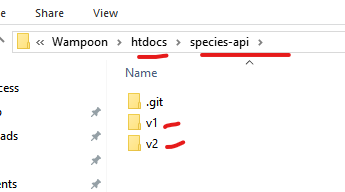
-
Update the
constants.phpfile in bothv1andv2directories.- Open
v1/config/constants.php - Locate this line:
define('APP_ROOT_DIR', basename(dirname(__FILE__, 2))); - Replace it with:
define('APP_ROOT_DIR', basename(dirname(__FILE__, 3)) . '/' . basename(dirname(__FILE__, 2))); - Save the file
- Repeat steps 1-4 for
v2/config/constants.php - Test your routes (e.g., access /your-api/v1/ping in the browser/Thunder Client)
- Open
-
Clients can now call a particular API version using the versioned base URI:
localhost/species-api/v1localhost/species-api/v2
-
Commit and push all updates to GitHub remote repository.
And that’s it! Your REST API now supports multiple versions via URI versioning.